Showing posts with label tutorials. Show all posts

Sunday, 2 November 2008

More than one way to skin a cat, continued...

Part 3 Using jQuery.AJAX() to load data and catch loading errors

Well, after a bit of a delay, here's the third part of my tutorial (part 1, part 2) demonstrating different ways of achieving the same result. In this part, I am going to use some more jQuery and CSS to build on what we coded in the last installment, and we are going to use the jQuery.ajax() function to add a bit more sophistication to our word generator.

Step 1 Create your HTML document.

First, we need an HTML document to contain and update our externally loaded content. Our page will contain a display area for the loaded text, and a button which will update the page on demand. It should look something like this...

<!DOCTYPE html PUBLIC "-//W3C//DTD XHTML 1.0 Transitional//EN" "http://www.w3.org/TR/xhtml1/DTD/xhtml1-transitional.dtd">

<html xmlns="http://www.w3.org/1999/xhtml">

<head>

<meta http-equiv="Content-Type" content="text/html; charset=utf-8" />

<title>Random words</title>

</head>

<body>

<div id="displayRandomWords"></div>

<div id="displayUpdateButton"></div>

</body>

</html>
Step 2. Add the jQuery library to your page.

As we will be calling upon the magic of jQuery again, we need to include the library in the head of our HTML so, add the following to the head of your page...

<script src="http://code.jquery.com/jquery-latest.js" type="text/javascript"></script>
Step 3 Write the code to do the clever stuff...

Now for the interesting bit. We need to create a function to call the random_words.asp, and if it loads successfully, display the output. We also need a nice preloading graphic to let users know that something is happening, and finally a link to reload new random words, so in your favourite editor, create a .js file as follows, and save it as jq_name_gen_part2.js
// Once the browser is loaded and ready to go...
$(document).ready(function(){

//define the getData function, to handle the data process....
function getData(){
// show the preload graphic....
$('#displayRandomWords').html('<img src="ajax-loader.gif" />');
// get rid of content from link button - It's not needed while data is loading...
$('#displayUpdateButton').empty;
// now setup the jQuery.AJAX function
$.ajax({
// type can be GET or POST....
type: "GET",
// file name of data to be loaded...
url: "random_words.asp",
// dataType - Use this to prevent unexpected results with loaded data
dataType: "HTML",
// Define function that fires when data is successfully loaded...
success: function(data){
// Build the Reload link...
$('#displayUpdateButton').html('<a href="#" id="aReloadData">Reload...</a>');
// Display the output from our server-side script...
$('#displayRandomWords').html('<strong>'+ data +'</strong>');
// setup the click event handler for the reload button...
$('#aReloadData').click(function(event){
// fire the getData function on click to reload new words...
getData();
})
},
// a simple bit of error trapping. If there is problem loading the data, show an error message...
error: function(){
$('#displayRandomWords').html('Oops, we seem to have hit an error!');
}
});
};
//Fire the getData function first time out to populate the elements onLoad....
getData();
});
Step 4: Make sure your .js file is included in the head of your HTML document, below your call for jQuery itself.Your HTML should now look like the following piece of code. Notice I have also included a CSS file to make it look a bit nicer too. You can download all the source code for this part of the tutorial from here.
<!DOCTYPE html PUBLIC "-//W3C//DTD XHTML 1.0 Transitional//EN" "http://www.w3.org/TR/xhtml1/DTD/xhtml1-transitional.dtd">

<html xmlns="http://www.w3.org/1999/xhtml">

<head>

<meta http-equiv="Content-Type" content="text/html; charset=utf-8" />

<link href="name_generator_demo.css" rel="stylesheet" type="text/css" />

<script src="http://code.jquery.com/jquery-latest.js" type="text/javascript"></script>

<script src="jq_name_gen_part2.js" type="text/javascript"></script>

<title>Random words</title>

</head>

<body>

<div id="displayRandomWords"></div>

<div id="displayUpdateButton"></div>

</body>

</html>

If you want to see it all running in your browser, click here...

In the next part, I will show how to use Flash and Actionscript 2 to load and display external data, so check back soon.

Friday, 24 October 2008

Top Ten Resources for Learning Web Design and Development

I've just been surfing about tonight, revisiting some old favourites and checking out some new sites friends have told me about. In the 12 years I have been working as a web designer/developer, I have often fallen back on other peoples code samples and tutorials to learn.

Some of my collegues on the design team have expressed an interest in learning some more technical, code based skills, such as JavaScript or ActionScript, and I am always keen to find tips and tricks for Illustrator, After Effects and Photoshop, as well as SQL, XML, or any one of many web design and development techniques, so, here's my top 10 resource sites if you're keen to learn...

  1. W3 Schools. - If you want to learn about any of the web design and development languages, including HTML, XHTML, CSS, JavaScript, SQL and much much more, this site should be your first port of call. Hundreds of clear examples and references make this site indispensible. Bookmark it!
  2. Webreference - Another indispensible site, for any of the popular web languages. Webreference is a HUGE site, and a great place to find new tips and tricks, from Multimedia and Internet Design to PHP and Active X programming. Essential!
  3. WebDesign Tutorials - I had'nt seen this site before today, but I'm impressed by the amount of content. The frames based displaay is a little irritating, but, if you can ignore that, there's a huge amount of useful stuff to be found, covering 3d Studio Max, PhotoShop, Flash, C++, CSS and much more.
  4. CSS Zen Garden - If you have'nt seen CSS Zen Garden, just go there. This site is the best illustration of the full potential of CSS when used well. A Stunning collection of stylesheets, showing how a single site can be completely redesigned, without touching the HTML mark-up. If you are into CSS, this is nirvana!
  5. Web Pages That Suck - At the other end of the spectrum from CSS Zen Garden, this is the place to go if you want to learn how NOT to do it. Well worth checking out, some of the sites listed are truly shocking! Just make sure one of YOUR sites never appear on this site!
  6. W3C HTML Validation and Jigsaw - These two sites are equally useful and important in the web designer/developers arsenal. If you want to be sure your site is vaild HTML and CSS, then you need to bookmark and use them both!
  7. SitePoint - I'm a big fan of SitePoint, both for their website, and the books they publish. SitePoint has a real community feel, with hundreds of quality articles, books, videos, forums and more. Well worth checking out.
  8. A List Apart - This is another indispensible site. With hundreds of authoratitive articles and tutorials about standards based and best practice web design, this is one you just can't do without.
  9. Webmonkey - This site has been around for years, and had undergone a re-design over the last year or so. With tutorials, a code library and reference sections, this is another really good place to start...
  10. Kirupa - This is a good site for those of you interested in Flash, Sliverlight, WPF and ASP.NET/PHP. Kirupa has been around for some time now, and has some top notch tutorials and artciles. Well worth a visit
If I've missed any, let me know! I'm always on the lookout for new sources of inspiration...


Powered by ScribeFire.

Thursday, 23 October 2008

Adobe.TV - Your first stop for learning Adobe software

I'm a big fan of Adobe software, I use many of their tools every day of the week. To be honest, they don;t have a massive amount of competition when it comes to design and deveopment software. With a line-up including Flash, Photoshop, After Effects, Indesign and Illustrator, it's hardly surprising.

So, if you want to get an idea of just how powerful the software can be, what the latest techniques and developments are, or you want to take your design and development skills to the next level, it's well worth checking out Adobe.TV - With channels for different disciplines, such as Video Professional, Photographer, Designer or Developer, there's plenty to pique your interest. Just select a video, sit back, watch and learn, and best of all, it's free.

It's also a good example of what you can do with a bit of Actionscript 3 and Flex.


Powered by ScribeFire.

Monday, 6 October 2008

More than one way to skin a cat, continued...

Part 2: Loading external data into a web page using jQuery.

In part 1 we setup our ASP page to spit out random words on demand, so now we can start examining the various methods of getting the random words into our web pages.

Seeing as I am a jQuery nut, I'm going to demonstrate the jQuery way first (well, one of a few). If you've not played with jQuery yet, this might convince you to have a go.

Step 1: Include the jQuery library in the head of your web page
<script src="http://code.jquery.com/jquery-latest.js" type="text/javascript"></script>
Step 2: Create a DIV in your page to contain the generated words
<div id="displayRandomWords"></div>
Step 3: Write the code to do the clever stuff..

Using your preferred text editor, create a new .js file and add the following code, then save it as jq_name_gen.js in the same directory as your html file.

// This is a basic "when everything is ready..."
$(document).ready(function(){

// This line tells jQuery to find an element with the ID 'displayRandomWords' and
// then to load the output from our ASP page into it. In one line of code!
$('#displayRandomWords').load('random_words.asp')
});

Step 4: Include your js in the head of your document

<script src="jq_name_gen.js" type="text/javascript"></script>

You should now have an HTML file that looks something like this...

<!DOCTYPE html PUBLIC "-//W3C//DTD XHTML 1.0 Transitional//EN" "http://www.w3.org/TR/xhtml1/DTD/xhtml1-transitional.dtd">
<html xmlns="http://www.w3.org/1999/xhtml">
<head>
<meta http-equiv="Content-Type" content="text/html; charset=utf-8" />
<script src="http://code.jquery.com/jquery-latest.js" type="text/javascript"></script>
<script src="jq_name_gen.js" type="text/javascript"></script>
<title>Random words</title>
</head>
<body>
<div id="displayRandomWords"></div>
</body>
</html>
When you run the page in your web browser (on the server, as the ASP won't run locally remember!) you should see the random words magically appearing in your DIV. Click here to see it running.

Simple huh? To be honest, I have simplified things here to demonstrate some of the cool stuff without boring you with geeky stuff. Things to bear in mind include the fact that you can only load data from the documents parent domain (if you want to load from a different domain you will need a server-side proxy, check back soon for an example), and there is nothing in place to check to make sure the data has loaded. We'll cover that in a later tutorial, along with handling other types of data, including JSON and XML.

So, thats the first way of skinning our "loading external data" cat, in part 3 of this tutorial I will be using CSS and jQuery to make this widget a little more interesting.


Powered by ScribeFire.

More than one way to skin a cat...

A tutorial about loading data using a variety of techniques - Part One

It struck me earlier, how as a web-geek, with so many tools and techniques available today, it's hard to know where to start sometimes. So, as a fun little exercise, I'm going to write my first proper tutorial, and not only that, I'm going to use a variety of technologies to illustrate my point.

I've no doubt many of you will have seen one of the "Web 2.0 Domain Name" generators out there, such as the Web 2.0 Domain Name Generator, or the more interesting Suggest.Name.

Back in 2000 I was one of the team involved in the now sadly defunct Music.gb.com, and I wrote a "Band Name Generator" using plain HTML and ASP. After looking about at some of the current generators out there, I thought I'd write an article showing a few different techniques to produce the same final result, using a combination of HTML, CSS, XML, Flash, ActionScript2, Actionscript3, JavaScript and jQuery.

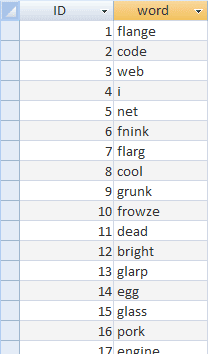
Still reading? Cool. Let's get started. For the purposes of this tutorial we're going to use a very simple Access database (you could be a lot cleverer with this if you like), with a table that contains the words we will use as the starting point for our generated words. The table only needs 2 columns (ID and word). Once you have created your table and entered a few words that appeal to your sensibilities (or lack thereof), you should have something like this...


As you may have read in my previous posts, I'm not a "proper programmer", so to make life easy, I'm going to use Dreamweaver to get the data to the browser. Don't worry, you can download the source files to accompany this article here. If you want to just copy and paste, you will find the data output ASP source code which you can adapt to your requirements here.

You should now have a working page which will give you a plain ASP document which outputs your generated word. Click here to see it. That should keep you amused until I publish part 2!


Powered by ScribeFire.